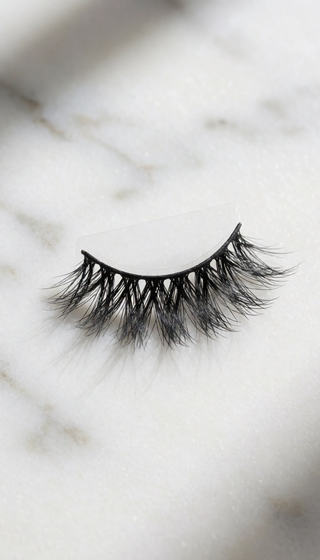
LASH USAGE FOR VIRTUAL MEETINGS: CAM-READINESS

You've been on back-to-back video calls all week, and every time you catch your reflection, you see a face that looks tired, washed out, or strangely unfinished — no matter how many times you redo your makeup. The truth: your lashes are the difference between looking "camera-ready" and looking "just woke up."
Here's what I've learned editing beauty content and testing more lash styles than I can count: lashes for virtual meetings are a completely different animal from lashes for a night out. They need to hold up to low-resolution webcams, harsh overhead lighting, and the dreaded blue-light glare. And when they don't, you end up looking like you have two dark smudges above your eyes — or worse, your lashes disappear and your eyes look small and tired.
So let's cut through the noise. This is a practical guide to choosing and wearing lashes for video calls — no fluff, no product pitches, just what actually works.
WHY CAMERA LASHES FAIL (AND HOW TO FIX IT)
A standard webcam shoots at 720p to 1080p, which blurs fine detail and flattens contrast. That's why lashes that look fluttery in a mirror can look like a dark blob on screen. The fix? Choose lashes with a thin, invisible band and plenty of separation between each hair. Dense, clumped strips turn into a single solid line. Also, pay attention to lighting: if your light source is directly above you, any lash longer than 13mm will cast a shadow onto your upper cheek that looks like dark circles.
- Use a light that's in front of you, slightly above eye level.
- Avoid very long lashes (over 14mm) for daily calls.
- Stick to a lash with a moderate curl so it lifts your eye without shading the lid.
THE 3 LASH ELEMENTS THAT SHOW UP AS "POLISHED" ON A WEBCAM
After watching hours of video call recordings, here's what separates a polished look from a messy one:
- Separation beats density. Sparse, defined lashes read as natural. Clumpy lashes read as "bad Zoom filter."
- Curl is your best friend. An open curl (between C and D curl) pushes your lashes up and out. That opening creates the illusion of a wider, brighter eye — which is exactly what a low-res camera loves.
- Width over height. Lashes that extend outward at the outer corner make your eyes look more awake and elongate the eye shape. Lashes that go too tall make your eye look like it's trying to escape the frame.
YOUR 10-MINUTE MEETING-READY LASH ROUTINE
You don't need 30 minutes to get camera-ready lashes. Here's my exact routine before every video call:
- Curl your natural lashes first, even if you're adding falsies. This prevents a double-lash line.
- Hold the lash strip near your eye and measure the length. If it extends past the outer corner, trim 2-3mm from the outer edge only.
- Apply a thin layer of lash glue on the band only. Wait exactly 30 seconds for it to get tacky.
- Place the lash as close to your natural lash line as possible. Press down gently for a few seconds.
- Mascara isn't mandatory — but if you add it, use a light coat to blend your natural lashes with the strip. Then do a quick check: turn on your front camera and look straight. If you see shadow under your lash line, push the lash up higher.
QUICK ANSWERS: LASHES FOR VIRTUAL MEETINGS
Should I wear false lashes on a video call?
Yes, if you choose a pair with a thin band and gentle curl. They help define your eyes without looking heavy. Avoid long, dense fan styles that create shadow.
What lash length is best for webcam?
In general, a medium length (10-13mm) with the longest part at the outer corner reads well on camera. Anything over 15mm can cast a shadow over your upper cheek and make you look tired.
How do I keep my lashes from touching my glasses during meetings?
Look for a style with more length in the center and a flared outer corner. Then push the lash band as close to your natural lash line as possible. If they touch, trim the outer edge 2-3mm.
Can I reuse lashes for daily video calls?
Yes. With careful removal and storage, a high-quality pair can last 10-15 wears. Keep the band clean and re-shape them after storing.
WHAT CAM-READY LASHES NEED (THE 3-SECOND SUMMARY)
If you want lashes for virtual meetings that don't poke you, look over-the-top, or fall off during your afternoon update — choose a pair with an invisible band, a moderate curl, and a shape that flatters your eye. That's the cam-readiness formula.
That's exactly why PHANSTA LASHES are my go-to for webcam days. Their lash trays are crafted with a light, flexible band and an open curl that mimics the natural lash effect — so you show up looking like you, just more awake.
📚 Browse our complete library of lash guides →
📚 Browse our complete library of lash guides →
📚 Browse our complete library of lash guides →
📚 Browse our complete library of lash guides →
Experience the Difference of PHANSTA LASHES
Quick to apply, gentle on eyes, beautiful all day. Reusable 30+ wears per pair.
SHOP PHANSTA LASHES — GLUE-FREE, 30+ WEARS →