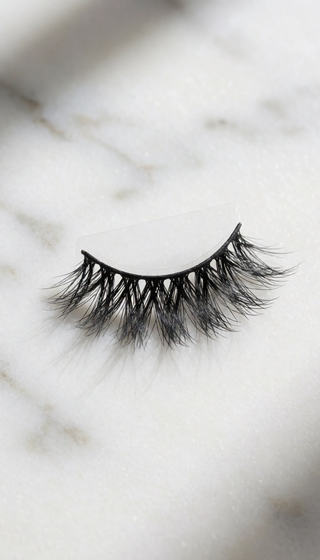
LASHES FOR A VIRTUAL DATE: CAMERA-READY LOOKS
Guarantee Your Eyes Look Sharper and More Defined on Camera, Even in Low-Resolution Video
Learn the science of video compression so your lashes read as perfectly defined, not washed out, during your next virtual meeting or date.

Understanding How Webcams Distort Your Eye Definition
When you view yourself on a screen, you are not seeing reality; you are seeing a compressed digital image. Webcams and phone cameras inherently flatten contrast, mute subtle color variations, and shrink the perceived distance between features. This digital compression is the primary reason a look that feels dramatic in person often appears flat or invisible on video calls.
Research into video perception indicates that lower-resolution video streams significantly diminish the visibility of small facial details, such as lash length and density. A lash that appears perfectly natural and wispy in person may register on camera as a significantly shorter, less impactful lash. To achieve a look that translates clearly and vibrantly through a digital lens, the physical characteristics of the lash must be intentionally amplified.
The Science of Visual Impact on Screen
The key to camera-ready lashes lies in creating visual anchors that the camera can detect, even when processing low-detail video. Here is what the digital lens prioritizes:
- Visible Density Over Wispy Separation: Lashes that are too spaced out or sparse tend to disappear entirely under compression. The camera reads gaps as a lack of definition.
- The Power of a Defined Band: Lashes with a dense, dark band provide a crucial element of contrast. This band acts as a built-in definition, mimicking the effect of liquid liner and ensuring the eye area has a focal point that the camera can register clearly.
- The Depth Created by Curl: A strong, defined curl (like a C or D shape) creates a natural shadow beneath the lash line. This shadow adds immediate depth and dimension to the eye area, counteracting the flattening effect of video compression.
Actionable Strategies to Optimize Your Look for Digital Viewing
To ensure your eye makeup translates perfectly on any screen, consider these layering and application techniques. These steps focus on maximizing visual impact without relying on heavy, potentially distracting makeup.
- Establishing a Dark Base: Applying a thin layer of dark adhesive along the upper lash line before applying lashes creates a foundational dark line. This mimics the effect of a liner, providing the necessary contrast against lighter skin tones for the camera to pick up.
- Selecting Volume for Definition: Opt for styles that feature a substantial, visible black band. This density ensures that the lash itself reads as a solid, defined shape, which is far more effective on video than sparse, individual fibers alone.
- The Outer Corner Lift: For an added effect of alertness and engagement on screen, place a single, carefully selected individual lash at the outermost corner of each eye. This subtle placement creates an illusion of lift that reads as more awake and attentive in digital frames.
Key Criteria for Selecting Camera-Optimized Lashes
When you are selecting a lash solution, focus on these three measurable attributes to guarantee your desired outcome on screen:
- Band Thickness: The band must be matte black and possess a minimum thickness of 1mm. This ensures the necessary contrast acts as your visual anchor.
- Curl Profile: Prioritize 'D' or 'DD' curl profiles. These strong curves create the necessary shadow depth on camera; gentler 'J' curls tend to flatten under video compression.
- Fiber Density: Avoid styles marketed as "wispy" or "airy." You need dense volume where the fibers overlap to create a solid, impactful block of lash that registers clearly on screen.
The Essential Checklist for Digital Lash Success
Beyond the physical lash structure, your application habits dictate how well the look performs. Consider these final pointers:
- Avoid Mascara Over Lashes: Applying mascara to your natural lashes before applying false lashes can create a clumpy, textured appearance that the camera interprets as smudging or dirt. Instead, gently press your natural lashes upward into the false lash to ensure a seamless blend.
- Adjust for Device Type: Phone cameras, particularly front-facing ones, compress images more aggressively than standard laptop webcams. For phone calls, select a volume level one step higher than you would for a laptop to compensate for this extra compression.
Achieving Camera-Ready Impact with PHANSTA LASHES
You now possess the technical knowledge regarding video compression, the necessary layering strategies, and the critical criteria for selecting high-impact lashes. The final piece of the puzzle is finding a solution that delivers this definition without the traditional risks associated with lash application.
PHANSTA LASHES utilizes advanced micro-adhesion technology, allowing for a flawless, glue-free application that adheres securely without irritating sensitive skin. Our collection is specifically curated to meet the demands of digital visibility, featuring dense volume and visible black bands designed to translate beautifully across any screen. We provide the tools to make you look your absolute best, effortlessly.
FREQUENTLY ASKED QUESTIONS
Are glue-free lashes safe for sensitive eyes?
Answer: Yes. PHANSTA LASHES are hypoallergenic, latex-free, and fragrance-free. They apply using micro-adhesion technology, eliminating the need for liquid adhesive, which is the most common cause of lash irritation. Always perform a patch test on your inner arm for 24 hours before initial use.
How long do glue-free lashes last per wear?
Answer: With clean, dry lids at the time of application, PHANSTA LASHES maintain their hold comfortably throughout a full day, even in light rain when using the waterproof variant. Longevity is primarily dependent on proper, clean application technique.
Can you really reuse PHANSTA LASHES 30+ times?
Answer: Yes, provided you maintain proper care. Gently remove them by lifting from the outer corner, wipe the band with a damp swab after each wear, and store them curved-side-up in the tray. Avoid soaking the band in any remover.
Do PHANSTA LASHES damage natural lashes?
Answer: No. Unlike traditional methods that involve pulling off dried glue, PHANSTA LASHES are designed to peel away cleanly without tugging or pulling on your natural hairs. Removal should always be gentle, starting from the outer corner.
How much do PHANSTA LASHES cost?
Answer: PHANSTA LASHES are priced at $59 per pair. Because they are reusable for 30+ wears with proper care, the cost breaks down to less than $2 per wear over a typical month of use.
Explore our occasion-specific lash guides:FIND THE PERFECT LASH FOR EVERY MOMENT
Quick to apply, gentle on eyes, beautiful all day. Reusable 30+ wears per pair.
SHOP PHANSTA LASHES — GLUE-FREE, 30+ WEARS →