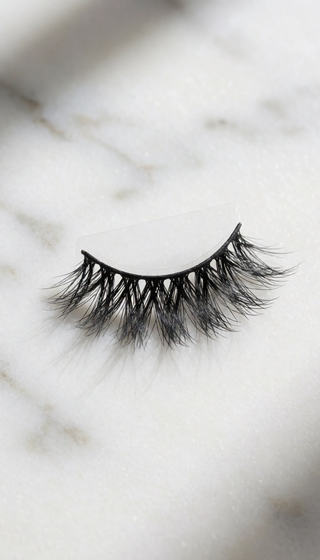
VIRTUAL MEETING LASHES: LOOK GREAT ON ZOOM

You know that feeling when you're on a video call and someone says, "Are you okay? You look tired"? You slept eight hours. You're fine. But your laptop camera is making you look like you just ran a marathon.
Here's the truth: your camera is not flattering. It flattens contrast, washes out color, and makes your eyes look undefined. And the fastest fix isn't a ring light, a 4K webcam, or a fancy backdrop. It's a pair of false lashes.
WHY LASHES ARE THE ULTIMATE ZOOM FILTER
Your laptop camera picks up skin color and hair color, but it struggles with depth. Features that are defined by shadow — like your eyes — become flat, empty shapes. That's why you look tired. It's not about how much sleep you got. It's about the lack of definition.
Lashes fix this instantly. Something as simple as a wisp of dark fiber along your lash line can make your eyes pop on camera. Think of it like this: a movie set can have expensive lighting, but it's nothing without the actors' features being read clearly on film. Lashes give your eyes a "readable" shape. They add contrast. They make you look awake.
I've tested this across Zoom meetings, webinars, and recorded video messages. With lashes, I get asked "Did you do something differently?" Without lashes, I get asked if I'm feeling okay.
THE 4 RULES FOR CAMERA-READY LASHES
Not every lash works on camera. Here's what I've learned testing this stuff so you don't have to:
- GO LONGER THAN YOUR MIRROR TELLS YOU TO. The lens eats length. If you normally wear 10mm in public, reach for 13mm for camera days.
- KEEP THE INNER CORNER SHORT. Let the length build toward the outer corner. This lifts your eye shape and counters that "camera zombie" look.
- PRIORITIZE LENGTH, NOT VOLUME. Volume lashes read as a dark smudge on camera. Length lashes give you clean, defined lines. Think "I woke up like this" but better.
- USE A THIN, FLEXIBLE BAND — AND GIVE IT TIME. The band needs to sit flush against your lid with no gaps. Before your call, apply lashes, wait at least 2 minutes, then open your eyes wide in the mirror. If you see any gap, gently adjust.
THE "I FORGOT MY CAMERA WAS ON" MOMENT
Last spring, I was leading a team meeting with clients. It was a back-to-back call day, I hadn't slept great, and I'd thrown on lashes out of habit more than expectation. Then a client said, "Lina, you look so bright today. Did you get a facial?"
Nope. Just lashes and a window facing me.
That's the thing about well-chosen lashes on camera. They don't scream for attention. They just make you look like yourself on a genuinely good day — the kind of day where you'd run into your ex and not flinch.
When you look good on camera, you feel different in the meeting. You sit up straighter. You make eye contact — camera contact. You speak with more energy. And the people on the other side of that screen? They feel it. It's not only about looking better. It's about how it changes the way you show up.
WHAT TO LOOK FOR IN ZOOM-READY LASHES
In my testing, here's the short list of what matters for video call lashes:
- LENGTH THAT SHOWS UP. If the lashes look "subtle" in the mirror, they're invisible on camera. Length is your friend.
- COMFORT FOR HOURS. You might wear them for repeated calls or a long meeting. A flexible, thin band is a game-changer.
- NO SHEDDING. A stray lash fiber on your cheek at the end of a presentation? Disaster.
| Lash Type | Band | Length Options | On-Camera Verdict | Comfort |
|---|---|---|---|---|
| Traditional strip lashes | Thick, stiff | Limited | 3/5 | 2/5 |
| Magnetic lashes | Magnetic ends | Some variety | 2/5 | 3/5 |
| Knot-style lashes | Flexible, thin | Multiple lengths | 5/5 | 5/5 |
| Extensions | Adhesive bond | Medium | 3/5 | 4/5 |
So maybe you're thinking: "Okay, I'm convinced. But I need lashes that are long enough for camera, comfortable for a 2-hour meeting, and won't shed while I'm presenting."
I know that feeling. I spent months cycling through lash brands that either looked invisible on camera or felt like little curtains weighing down my eyelids.
Then I found PHANSTA LASHES. They're knot-style lashes with a flexible thin band that stays invisible on camera. The featherlight feel means you'll genuinely forget you're wearing them — even on hour three of a meeting. And because they don't shed, you can talk, gesture, and meme away without a fiber falling into your eye. They're the closest thing to a camera filter I've found that doesn't plug into a wall.
Give your next video call an unfair advantage.
What type of lashes look best on Zoom?
Lashes with length and a clean, defined edge — not heavy volume. Length creates a visible frame around your eyes on camera. Featherweight, knot-style lashes with a flexible band work best.
How long can I wear false lashes for a video call?
With a comfortable, flexible band, you can wear lashes for 8+ hours without irritation. Just make sure to apply them 2 minutes before your call and check for a snug fit.
Will lashes look weird on a laptop camera?
No. In fact, the opposite. Laptop cameras flatten features, which is why lashes are so helpful — they add the definition your camera removes. What looks "a little extra" in the mirror looks natural on camera.
📚 Browse our complete library of lash guides →
📚 Browse our complete library of lash guides →
📚 Browse our complete library of lash guides →
Experience the Difference of PHANSTA LASHES
Quick to apply, gentle on eyes, beautiful all day. Reusable 30+ wears per pair.
SHOP PHANSTA LASHES — GLUE-FREE, 30+ WEARS →